


BrickSearch Minifigure Scanner
3.1395.00 Reviews
App Specs
- Version
- 4.3.2
- Updated On
- License
- Free
- Downloads
- 500,000+
- Developer
- Tiro Media Ltd
- Categories
- Shopping
- Platform
- Android
Screenshots
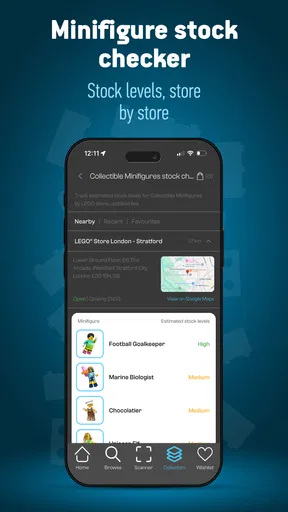
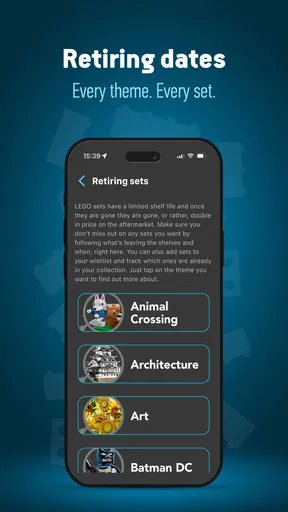
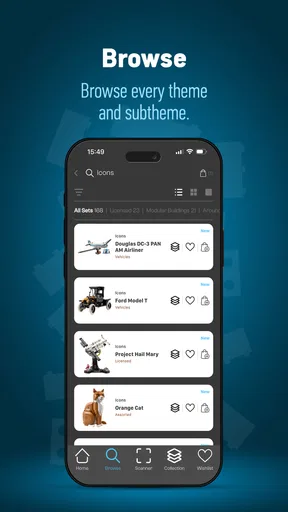
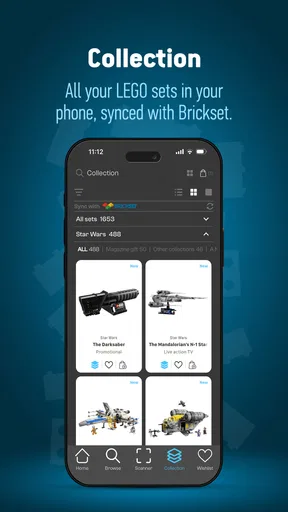
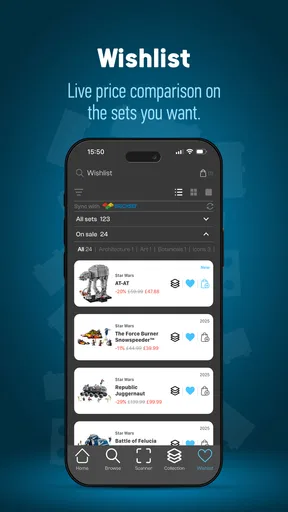
 Analysis by AppCompare
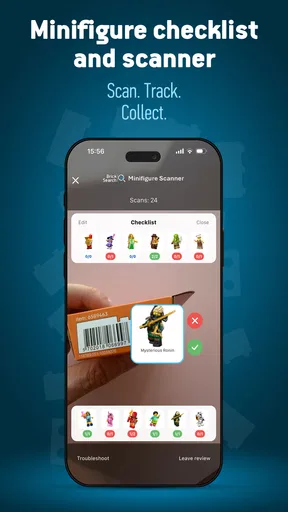
I approached BrickSearch Minifigure Scanner as a practical shopping companion rather than another app I would open every day. Its focus is narrow but appealing: helping LEGO minifigure collectors identify boxes, keep track of what they own, and connect purchases with cashback. That combination makes sense when you are standing in a shop with several sealed boxes and want to avoid buying the same character twice.
The app comes from Tiro Media Ltd and sits in the shopping category. It is free to install, aimed at Everyone, and supports devices running Android 7.0 or later. The current release is version 4.3.2. It has passed the half-million-install mark and holds an average of 3.1 from roughly 4.4 thousand ratings, so there is clearly a real collector audience, although the rating also suggests that the experience is not equally smooth for everyone.
How BrickSearch fits into a collector’s routine
The most useful way to think about this app is as a bridge between the physical shelf and a digital collection list. LEGO minifigure boxes can be difficult to distinguish by touch alone, and manually recording every purchase is tedious. A scanner-based workflow can reduce that friction: check a box, identify the likely figure, then mark the result against your collection instead of relying on memory.
That is especially valuable for people who buy individual blind boxes rather than complete sets. I can imagine using it before purchasing two or three boxes at a store, checking each one in turn, and comparing the results with the figures already recorded. The benefit is not simply speed. It is the chance to make a more deliberate purchase when the packaging gives you very little useful information at a glance.
The collection-tracking side also changes how the app feels over time. A scanner is useful during a shopping trip, but a collection record becomes more valuable after several trips. It can help you remember which figures are already at home, which ones you were still looking for, and whether a tempting box is likely to add something new. For a casual buyer, that may be unnecessary. For someone building a series, it can become a sensible part of the buying process.
Scanning is helpful, but the surrounding workflow matters
The scan itself is only one step. The real test is what happens afterward: whether the result is easy to understand, whether it can be added to the right collection, and whether correcting a mistake is straightforward. A good scanner should not leave you with a mysterious result that still requires a separate search. The appeal here is the combination of recognition and organization, not the camera action in isolation.
I would use the app with a simple habit: scan before buying, confirm the figure against the box and the app’s result, then update the collection immediately. Delaying the last step creates the same problem as keeping receipts in a drawer. The information may technically exist, but it is no longer useful when you need it.
Worth Reading Before You Choose

EA SPORTS FC Mobile 26 Is a Bigger Football Game, but It Takes Time

Flipboard Shows What News Apps Must Do Beyond the Feed

Switching to Android Auto Means Rethinking Your Driving Routine

Google Calendar Makes a Crowded Week Easier to Manage

Ludo King Makes the Most of the Minutes Between Plans

Baby Panda World Brings Quick Play to Modern Phones, but Its Game Library Feels Busy
There is also a sensible reason to treat the scan as assistance rather than absolute proof. Packaging can be angled, lighting can be poor, and a busy retail shelf is not a controlled environment. If a figure matters to you, I would verify the displayed identification before paying and again when putting the item away. That small pause is worthwhile because a collection tracker is only as accurate as the entries it receives.
What happens during a busy shopping session
The app’s perceived speed matters most when several boxes are waiting to be checked. A single scan that feels acceptable at home can become frustrating if every attempt requires repositioning the box, waiting for recognition, or navigating through extra screens. In a shop, I would expect the best experience when the camera has a clear view and the packaging is held steadily, rather than when I am trying to scan hurriedly from a crowded display.
For heavy use, I would prepare before leaving home. Opening the app once, making sure the collection is organized, and knowing what I am looking for reduces the amount of decision-making in the aisle. This is a more important performance tip than chasing tiny differences in scan time. A well-prepared workflow makes the app feel faster because fewer actions are competing for attention.
Battery and data use are also more noticeable during repeated scanning than during occasional collection maintenance. I would not treat BrickSearch as a demanding game or an app that needs to run continuously. Its resource impact should be most apparent while the camera and scanning process are active. If your phone is older or already low on battery, scanning an entire display may be less comfortable than checking only the boxes that fit your collecting plan.
That limitation is not unique to this app, but it affects whether the tool replaces a handwritten list. A note on your phone opens instantly and consumes very little power. BrickSearch earns its place when identification and collection updates are worth the extra step. If you only need to remember three names, a basic note may be quicker. If you are comparing many blind boxes, the specialized workflow has a stronger reason to exist.
Stability, mistakes, and recovering your collection
The average rating of 3.1 tells me to keep expectations realistic about reliability. It is not evidence that the app fails for everyone, but it is a clear reason to pay attention to recovery. When using any collection tool, I want to know what happens after a missed scan, an accidental entry, or an interrupted session. The safest approach is to review each addition instead of scanning a large batch and assuming every result was recorded correctly.
I would also avoid treating the app as the only record of valuable collection information. For a small collection, that may not matter much. For a carefully assembled series, I would occasionally check that the in-app list matches the physical figures on the shelf. This is not because the app is necessarily unreliable; it is because duplicate purchases and mistaken entries are easier to fix when noticed early.
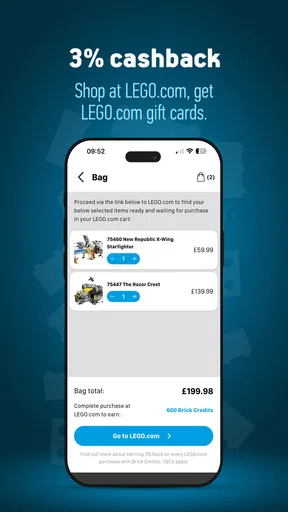
Cashback adds another layer that deserves attention. It can make the app more attractive to shoppers who already intend to buy, but it should not turn into a reason to purchase figures you did not want. I would view cashback as a secondary benefit and read the relevant purchase conditions before relying on it. The free installation makes trying the shopping workflow low-risk, while optional in-app purchases range from $0.49 to $39.99 per item, so I would keep an eye on any paid extras and decide whether they genuinely improve my use.
The recovery mindset is simple: scan one item, confirm it, save it, and only then move on. That may sound slower than processing everything at once, but it prevents a small mistake from becoming a full collection cleanup job. It is particularly useful when scanning in a noisy shop, where interruptions are more likely than they would be at home.
Older phones and practical device limits
Support for Android 7.0 or later gives BrickSearch a broad compatibility range, but an older supported operating system does not automatically mean an identical experience on every phone. Camera quality, focus behavior, available storage, and general system responsiveness can all affect how comfortable scanning feels. A newer phone may lock onto packaging more easily, while an older model may require steadier positioning and better lighting.
I would use a clean, uncluttered surface at home when organizing a large group of figures. At a store, I would avoid placing the box under harsh glare or covering the area the camera needs to read. These are basic habits, but they often matter more than the app’s label or device age. If your phone struggles with camera apps generally, this is unlikely to be the tool that suddenly makes scanning effortless.
Screen size also affects collection management. A compact phone is perfectly reasonable for occasional scans, but reviewing a long list of figures is more comfortable on a larger display. That makes the app better suited to quick retail decisions and regular collection updates than to deep catalog management sessions on a very small device.
I would not install it expecting an entertainment app or a broad shopping marketplace. It has a specific job. People who want price comparison across every retailer, a general LEGO catalog, or a universal inventory system may prefer a wider shopping or collection alternative. BrickSearch is more compelling when the problem is specifically blind-box identification combined with personal tracking.
Where it beats ordinary notes and where it does not
A notes app is the obvious alternative for keeping a checklist. It is flexible, familiar, and quick, but it leaves you to identify the figure and maintain the list manually. BrickSearch has the more specialized idea: use the camera as part of the buying decision, then connect that moment with collection management. For a collector who regularly encounters sealed minifigure boxes, that specialization is the main advantage.
A spreadsheet can handle more detailed information, such as purchase location, condition, duplicates, or personal value. It is also easier to customize. The trade-off is effort. A spreadsheet is excellent when your collection has become a serious inventory, but it may be excessive when you simply want to avoid duplicates. BrickSearch occupies the convenient middle ground, provided its scanning and tracking flow matches your needs.
There is another important comparison: buying a complete series or using a specialist collector community. Those approaches may give you more certainty about what you are getting, while this app is aimed at making individual box purchases more informed. If you dislike uncertainty altogether, scanning may not change your preference for complete sets. If you enjoy hunting but want fewer accidental duplicates, the app has a clearer purpose.
Who will get the most from it
I think the strongest audience is an active minifigure collector who shops in person, buys sealed boxes, and wants a running record without building a spreadsheet. Parents shopping with children may also appreciate a quick way to check whether a box is likely to duplicate one already owned. The free entry point makes it reasonable to test the process before deciding whether the collection features fit your habits.
It is less suitable for someone who buys only complete sets, rarely purchases blind boxes, or wants a detailed inventory unrelated to minifigures. It may also disappoint users who expect every scan to be instant in poor lighting or who do not want to review results manually. The app can reduce uncertainty, but it cannot remove the need for sensible checking.
My ideal everyday scenario would be a collector visiting a shop after work. Before leaving, I would review the figures already recorded and choose a short target list. At the display, I would scan only boxes that might fill a gap, confirm each result, and update the collection before walking away. Later, I could use the cashback side when it applies, but the purchase decision would still come from the collection goal rather than from the reward.
My performance verdict after weighing the trade-offs
BrickSearch Minifigure Scanner is a focused shopping app with a useful idea: make sealed minifigure purchases less dependent on guesswork, then keep the result connected to a personal collection. I like that the app addresses a specific collector frustration instead of pretending to be a complete solution for every kind of shopping.
Its perceived speed will depend heavily on the phone, lighting, camera handling, and how many boxes you process in one visit. Its resource demands should be most relevant during repeated camera use, not ordinary list maintenance. The realistic reliability strategy is to scan in small batches, confirm entries, and keep an occasional physical check of the collection. Those habits make the app more dependable even when the retail environment is messy.
The rating of 3.1 from around 4.4 thousand ratings keeps me from calling it an effortless must-have. Still, the half-million-plus installs show that the concept has reached a substantial audience. For the right collector, the combination of scanning, tracking, and cashback can justify adding another shopping tool to the phone. My recommendation is conditional but positive: try it if blind-box minifigures are a regular purchase, and skip it if a simple checklist already solves your problem.
Because it is free and rated for Everyone, the sensible decision is to test it during a small shopping trip rather than committing your whole collection immediately. If the scan-and-confirm routine feels natural on your device, it can become a practical safeguard against duplicates. If it feels slow or demands more correction than your current note-taking method, the specialized features may not outweigh the extra friction.
Pros
- Quickly identifies many LEGO minifigures using the phone camera.
- Helps shoppers check blind-box contents before buying.
- Simple interface that is easy to use in-store.
- Useful collection tracking features for LEGO enthusiasts.
- Can save time compared with manually checking set codes.
Cons
- Scanning accuracy can vary with lighting
- focus
- and packaging condition.
- Coverage may be limited for very new or uncommon minifigures.
- Some features may require a premium subscription or in-app purchase.
- The app depends on an internet connection for parts of its database.
- Camera scanning may struggle with damaged or poorly printed codes.
FAQs for BrickSearch Minifigure Scanner
What is BrickSearch Minifigure Scanner?
BrickSearch Minifigure Scanner is a mobile companion for LEGO minifigure collectors. It uses your phone’s camera to scan the printed code found on compatible minifigure packaging, helping identify the character before you buy. The app can also provide information such as the minifigure name, series, and collecting details, making it useful for checking blind-box contents in stores or organizing a collection at home.
How does the minifigure scanning feature work?
To scan a figure, open the scanner, point your camera at the code on the packaging, and keep the phone steady while the app analyzes it. Good lighting and a clear, unobstructed code generally produce the best results. Scanning is not the same as recognizing a loose minifigure by appearance; it relies on supported packaging codes, so damaged, hidden, or incompatible codes may not be identified correctly.
Which LEGO minifigures are supported by BrickSearch Minifigure Scanner?
Support depends on the minifigure series and the packaging codes included in the app’s database. The scanner is mainly designed for compatible newer blind-box releases rather than every LEGO minifigure ever produced. Before downloading, collectors should check the app’s current listing and update notes, because coverage can change as new series are released. Older packages, regional variations, or unofficial products may not work.
Does BrickSearch Minifigure Scanner require an internet connection?
An internet connection may be needed for downloading the app database, receiving updated series information, loading product details, and keeping collection data synchronized, depending on the version and feature being used. Camera scanning itself may work in some situations without a constant connection, but offline behavior can vary. For the most reliable experience in a store, open the app and update its content before going shopping.
Is BrickSearch Minifigure Scanner free, and are there any limitations?
The app may be available to download for free, but some tools, collection features, or enhanced information can depend on the current version’s pricing model. Store listings should be checked for subscriptions, optional purchases, advertising, and platform-specific differences before installation. Also remember that scanning accuracy is affected by lighting, camera quality, packaging condition, and database support, so the app should be treated as a helpful aid rather than a guaranteed result.


